For Shopify teams launching in Japan
A Japanese storefront review your team can act on.
Find confusing Japanese copy and visible problems in the customer journey. Get the exact wording, screen evidence and suggested changes your team needs to fix them.
One store. A clear scope. No store admin access required.
Judge the work by the work.
This is Nami Paper, a fictional digital stationery shop I built for this demonstration. You can open both versions and follow the findings through the report and editable CSV. It is a self-created example, not a client result.
A button label is cut off on mobile.
At 390px, the original product page crops its long Japanese action label. The wording also implies checkout, although the button opens a simulated cart page.
The shorter label fits the checked width. On a live store, use it only when the action adds the item; use カートを見る for a cart link. The sample is a static simulation, and no conversion lift is claimed.
Original · 390px
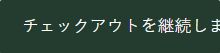
Suggested revision · 390px

Prefer to run the review yourself?
A practical workbook for your own team.
Use 24 manual checks to turn a small Japanese storefront review into clear tasks for your developer. Record the page, conditions, observation and evidence; keep unknowns visible.
JPY 2,900 One-time DIY download
English material. BOOTH account and checkout requirements apply; payment availability depends on your country and provider.
What’s in the current download
- A printable English HTML workbook with 24 manual checks.
- An editable checklist and a blank issue log with 17 columns.
- Three clearly labeled illustrative records and a developer handoff template.
- Use and adapt it in your business; share completed reports with your clients.
Extract the ZIP and open the HTML locally. No install or subscription. Blank template resale is excluded. This is a DIY resource; individual review and implementation are separate.
From a finding to a useful handoff.
A report should tell your team what to change, why it matters and how to check it. Every finding has an ID that follows through to the copy file.
01
Observe & reproduce
Identify the page, the browser width and the action that exposes the problem. Capture the relevant screen.
02
Explain & suggest
Describe the user-facing problem in English. Supply Japanese wording with the intended meaning and any facts that need your confirmation.
03
Hand over & recheck
Deliver a prioritized report and an editable CSV. After your team makes changes, request one check of the same scope within seven days.
A focused first review
Know the scope before you order.
$149 USD · review fee
For one Shopify store with a Japanese launch or an existing Japanese storefront. Send a public URL and the journey you want reviewed; I’ll confirm fit before you place an order.
Prepare a review inquiry →Use the platform’s checkout for an agreed order. Any fees shown there are separate.
- Coverage: up to three agreed public URLs, one customer journey and 30 Japanese text items.
- Deliverables: an English findings report, relevant screenshots and a CSV of suggested Japanese wording.
- Checks: desktop and mobile browser widths. Real-device behavior is not established by a resized browser.
- Timing: five calendar days after a funded order and complete inputs.
- Follow-through: one recheck of the same scope, requested within seven days of delivery.
Implementation, theme code changes, checkout purchases and store admin access are outside this review. If the problem needs development or specialist compliance advice, I’ll identify that before ordering.
Who you’ll work with
Yudai Shintake.
Based in Japan.
I am a Japan-based web engineer with five years of experience. I build browser tools and publish worked examples you can inspect. For a storefront review, I connect each observation to its screen evidence, suggested Japanese wording and a way for your team to check the change.
I communicate asynchronously in writing from Japan Standard Time (UTC+9). My overall freelance availability is up to 20 hours per week; project capacity and delivery dates are confirmed before ordering.
Published tools you can verify
- Discord translation extension: translation controls for Discord in the browser. Official Chrome Web Store listing ↗ · Read the implementation notes.
- Telegram translation extension: a translation sidebar for Telegram Web. Official Chrome Web Store listing ↗ · Read the implementation notes.
Store listings checked on 7 October 2026. These are examples of tools I have published. The storefront report is a separate, self-created demonstration; it does not represent a paid Shopify client engagement.
You can also try the small browser tools before buying their offline editions.
AI use and your data
AI may assist with first-draft wording and organizing notes. Findings and recommendations are checked against page evidence. Before work begins, we agree on AI use and the data that may be processed. Public URLs and non-sensitive context are enough for the initial fit check.
Please do not send passwords, customer records, payment information or confidential files in the first message.
Before you order
Tell me what needs a second look.
A public store link and the question you want answered are enough to start. I’ll confirm whether the review fits your needs.
$149 USD · one-store review
- Up to 3 agreed public URLs, 1 journey and 30 Japanese text items.
- English report, screen evidence and Japanese wording CSV.
- 5 calendar days after a funded order and complete inputs.
- 1 recheck of the same scope, requested within 7 days.
Review and recommendations only. Implementation and store admin access are outside this service.
Use public links and non-sensitive context. Please leave out passwords, customer records and confidential files.
Prefer to write directly? Discuss your store on Contra ↗
The email link opens your mail app; you choose when to send. If no app is set up, copy the text into a Contra message ↗. A scope inquiry is not an order or a delivery commitment.