Self-created sample · Nami Paper · 7 October 2026
A review you can trace from screen to suggested change.
Two issues on one fictional product-to-cart journey. Each finding links to a working example and an editable Japanese copy row.
I authored this HTML fixture and its intentional defects. It is not a real Shopify store, a client engagement or evidence of revenue improvement. Suggested wording describes only the fixture’s known behavior.
Review scope
Three public fixture pages: product, cart and download guidance. One journey: product → add item → cart. Two Japanese text items. Desktop and mobile browser widths; these are browser checks, not real-device tests.
| ID | Finding | Priority |
|---|---|---|
| NP-01 | Action label is clipped and describes the wrong next step | Fix before launch |
| NP-02 | Digital delivery information is separated from the buying action | Clarify before launch |
The product action should be visible and accurate.
Observation: at a 390px browser width, the long label exceeds the fixed-width button container. The parent hides the overflow. The label implies continuing checkout, but clicking it navigates to the demo cart.
Reproduce: open the original product page at 390px; inspect the action below the price, then click it. It opens the cart rather than a checkout step.
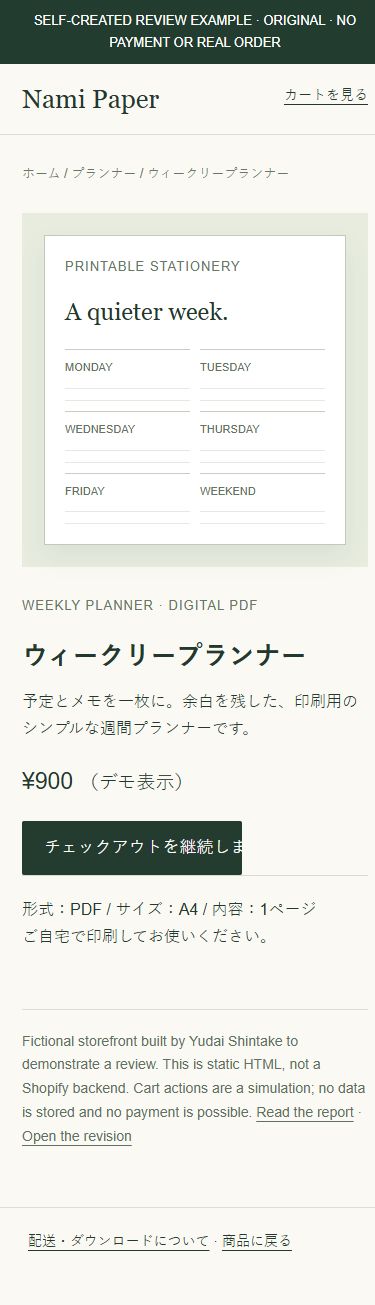
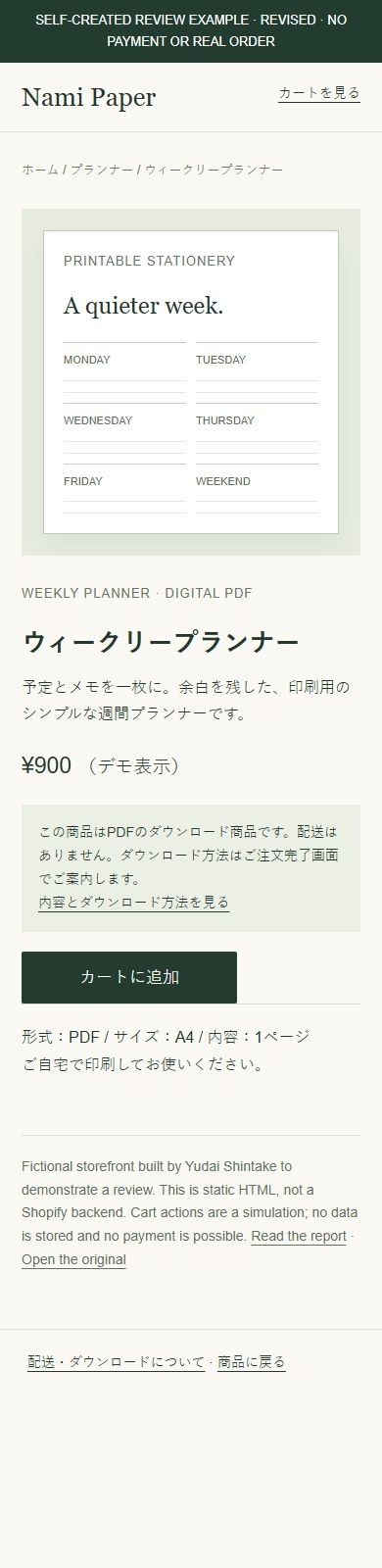
Wording decision: カートに追加 means “Add to cart” and matches the addition step this fixture simulates. カートを見る would describe viewing an existing cart; 購入手続きへ進む would describe starting checkout. Choose the label after confirming what the merchant’s button actually does.
Checked change: the revision retains the 220px button width and permits text wrapping. The observed cropping is removed at the checked widths. The demonstrated action is a transition to a simulated cart page; it does not establish a working Shopify cart or checkout integration.
Recheck: use the revised product page. Confirm that the full label is visible and that the action still opens the cart. Browser verification results are recorded below.
Say what the buyer receives before they act.
Observation: the original product page says “digital PDF” and specifies the format, but its no-shipping and download guidance sits on a separate footer-linked page. The action area has no delivery explanation.
Why revise: placing that information next to the action lets someone check the delivery method without leaving the product page. This is a usability recommendation, not a measured abandonment or conversion finding.
この商品はPDFのダウンロード商品です。配送はありません。ダウンロード方法はご注文完了画面でご案内します。
Suggested meaning: This is a downloadable PDF. No physical shipping. Download instructions are provided on the order-completion screen.
Merchant confirmation: in this fixture the delivery policy is authored and known. On a real store, confirm whether delivery uses the completion page, email or an app before adopting this wording.
Recheck: the revised product page includes the explanation above the action, with a working link to download guidance. This fixture cannot verify a real order or file-delivery integration.
Verification receipt
| Check | Observed result · 7 October 2026 |
|---|---|
| Original button, 390px | Text content width 221px exceeds the 176px inner label area; overflow is cropped. Click opens the demo cart. |
| Revised button, 390px / 768px / 1440px | Label scroll width equals its available width (176px at each checked width). Full label is visible. |
| Revised journey | Add-to-cart opens the cart; the cart guidance link opens the download page. Checked by actual browser clicks. |
| Copy file | Two UTF-8 CSV rows, NP-01 and NP-02, match the report IDs. Merchant confirmation is retained. |
No live payments, accounts, personal data or customer records are involved. The comparison establishes the described fixture behavior only.
What the merchant receives
The same issue IDs appear in the English report and copy CSV. Each row includes location, current Japanese, suggested Japanese, intended meaning, priority and any confirmation needed. Your team can review the suggestion before implementing it.
See the service scope and price →